Astuces info | IPA ,APK, Android,Iphone,Ipad,Ipod: GSM Tools

Astuces info | IPA ,APK, Android,Iphone,Ipad,Ipod

astuces et trucs des application ,jeux,ipa,apk, tous les nouveautés des jeux et theme android et iphone ipad ipod,tablette, tous ce que vous chercher dans l internet

Affichage des articles dont le libellé est GSM Tools. Afficher tous les articles

mercredi 10 juillet 2013

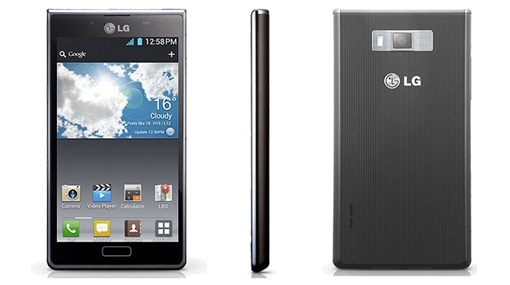
Lg optimus l7 p700 Rooter,rom custom,bootloader

05:07
Lg optimus l7 p700 Rooter,rom custom,bootloader
voici une astuce pour rooté le lg optimus l7 plus deux trois optimisations ;)

Lg optimus l7 p700 Rooter,rom custom,bootloader


1.mise a jour et rooter (V10i )

En 1er télécharger ce fichier
http://www.mediafire.com/?16ay7ituwwhnib3

Télécharger en suite la dernière version du firmware :
http://lg-phone-firmware.com/index.php?id_mod=13

Télécharger le fichier http://albafile.com/w9696umdwhtf/pour_nous__l7_.rar.html

(Archive en 4 parties, a réunir avec 7Zip pour avoir un seul fichier qui se nomme system.img.ext4 qui faut ensuite copier sur votre disque C)
logiciel 7zip pour le pc

lancer le 1er fichier
et cliquer là ;)


Image

sélectionner 3GQCT et EMERGENCY et parcourir les fichiers pour charger votre V10I (ou autre)
NE FAITES PLUS RIEN. Ne cliquez pas sur 'Launch Software Update'. (Laissez ouvert comme ça)


Trouvez ensuite votre dossier LGMOBILEAX (Commencez par cocher l'option 'Afficher les fichiers et dossiers cachés' dans fichier/option des dossiers etc)

Chez moi le dossier était dans Disque:C/ProgramData/LGMOBILEAX (Laissez ce dossier ouvert)

vous avez logiquement, votre system.img.ext4 copié sur votre disque C, et votre logiciel de flash ouvert prêt a être utilisé

Ensuite, vous éteignez votre portable, puis vous le passez en mode EMERGENCY
(Une fois éteint touche volume UP + Mise sous tension) une petite vibration et hop écran jaune avec écrit 'EMERGENCY'

ETAPE LA PLUS IMPORTANTE (a lire avant la manip) :

Vous allez brancher votre portable, puis cliquez sur 'LAUNCH SOFTWARE UPDATE' (gardez le dossier LGMOBILEAX et votre disque C avec votre system.img.ext4 (Image modifié) sous la main)
Donc au moment ou vous allez cliquez sur LAUNCH SOFTWARE UPDATE, le log commence son boulot, au même moment dans le dossier LGMOBILEAX un dossier 'phone' apparaît entrez dedans, vous devriez voir un nouveau fichier nommé system.img.ext4 apparaître aussi, qui grossi de plus en plus (Rafraîchissez le dossier) une fois que ce fichier a atteint sa taille maxi, c'est a dire 430 mo (soit affiché 430 000 ko dans le fenêtre windows) vous la supprimez et vous copier votre system.img.ext4 (ou couper coller)modifié que vous avez copié sur votre disque C juste avant. On supprime l'ancienne, on met la nouvelle. Et voila c'est fini.


En attendant le logiciel de flash continue son boulot, il affiche des erreurs mais c'est pas grave. il affiche plein de 'NOT FOUND' mais c'est pas important.

Vous attendez la fin, votre portable démarre, le logiciel écrit 'FINISHED' (le logiciel plante a la fin chez moi, mais c'est normal)

vous avez un portable rooté sur la v10i

PS : Il est possible que votre clavier par défaut LG crash a l'ouverture du téléphone après le root et soit inutilisable. Je n'utilise pas ce clavier, j'utilise SwiftKey 3 donc j'ai pas eu ce problème.


Donc en 1er et AVANT TOUTE MANIPULATION DE VOTRE TELEPHONE telecharger SwiftKey 3 ou autre clavier

voila logiquement en même pas 1h tout et fait


2.Comme beaucoup de personnes recherche comment procédé pour faire
un reset complet sur le lg optimus p700

je ne parle pas de hard reset sinon c'est ici --->
hard-reset.html

1- arrêter votre mobile

2- tenir les touche suivante enfoncé et dans cette ordre
(volume+)+(volume-) + (touche centre en bas) + power

3- le mobile vas vibré tout lâché

4- attendre de une a deux secondes et re cliquer sur power rapidement
un robot doit apparaître

5- re cliquer sur power pendent 1 a 2 secondes
une liste en bleu vas apparaître
avec écrit:
Android System Recovery (3e)
Android system recovery utility
--- Reboot
--- Apply Update
--- Wipe Data/Facory reset
--- Wipe cache partition

6- allez sur Wipe Data/Facory reset et supprimer le fichier a l'interieur
nettoyez aussi Wipe cache partition

7-faire reboot avec la ligne correspondante

Image


3.Pour liée les applications sur la carte sd


Link2SD déplace les fichiers apk, dalvik-cache (.dex) et lib (.so) vers la carte SD.

https://play.google.com/store/search?q=link2sd

Link2SD ne peut être mis en œuvre que sur un téléphone avec les droits "ROOT"

formater votre carte sd avec : http://www.partitionwizard.com/

créé une 1ere partition PRIMAIRE FAT32 bien grosse pour pouvoir avoir du stockage

créé une 2eme partition PRIMAIRE EXT2 de 1.37 Go

la sd dans le mobile lancé Link2sd choisir ext2

liée vos applications

Image


4.Pour remplacer les applications d'origine

télécharger cette application : play.google.com/store/apps/

comme le téléphone et root, après désinstaller la galerie + photo origine ;)

l'application fait galerie,photo et caméra (+camera 360°)

il faut faire pareil pour le lecteur audio vidéo

télécharger PlayerPro Music Player

puis désinstaller l'original (encore de la place en + dans la room ;) )

pareil avec le navigateur internet d'origine
télécharger Dolphin Browser

idem pour la calculatrice
télécharger RealCalc Scientific Calculator

puis désinstaller l'original (encore de la place ;) )

idem pour le calendrier d'origine
télécharger Jorte Calendar

puis désinstaller le calendrier d'origine

logiquement avec ça vous gagnez pas mal de place
la room sera bien plus légère ;)

Comme application superbe aussi et utile ;)
il y a l'application WiFi Manager

@++ ;)
Read More

Désimlocker votre Samsung Galaxy S3 [android]

04:53
Désimlocker votre Samsung Galaxy S3 [android]
'ai la chance d'avoir un Galaxy S III acheté sans aucun forfait donc "unlocked" tout opérateur, mais ce n'est pas le cas de tout le monde.
Désimlocker votre Samsung Galaxy S3

Il y a 2 possibilités :

- Attendre 3 mois depuis votre abonnement ou renouvellement pour le faire débloquer par votre opérateur !

ou

- Le faire immédiatement via un de ces tutos :

Image
NOTE: ATTENTION, FIXÉ DANS LES FIRMWARES SUPÉRIEURS À FIN JUILLET 2012


1er tuto :

Désimlocker votre Samsung Galaxy S3 avec GalaxSimUnlock.

Avoir rooté son mobile
Avoir Busybox => ICI d'installé

Sur votre mobile aller dans Paramètres, puis Sécurité et cochez Sources inconnues.
Télécharger, copier GalaxSimUnlock => ICI sur la carte SD de votre Galaxy S III et l’exécuter.

Une fois l'installation fini lancer l'application et vous obtiendrez ceci:

Image

Il ne vous reste plus qu’à appuyer sur le bouton Unlock.
Redémarrer votre mobile, votre Galaxy S III est désormais tout opérateur


2ème tuto


Maintenant que vous avez un Galaxy Samsung SIII rooté, ce serait bien d'unlocker la bête non ? Voici comment le faire en... 20 secondes. Top chrono ! C'est parti.


Maintenant, vous pouvez aller sur Google Play pour télécharger Voodoo Galaxy SIII SIM Unlock => ICI. Une fois téléchargée et installée (n'oubliez pas dans vos paramètres d'autoriser les sources inconnues), lancez l'application et cliquez sur Unlock.

Image

Voilà, c'est terminé ! Ce téléphone est définitivement fantastique !
Read More

jeudi 27 juin 2013

How to Root Samsung Galaxy S2 Skyrocket [I727UCMC1] Android 4.1.2 Update

04:17
How to Root Samsung Galaxy S2 Skyrocket [I727UCMC1] Android 4.1.2 Update
Galaxy-S-II-Skyrocket-HD[1]


How to Root Samsung Galaxy S2 Skyrocket [I727UCMC1] Android 4.1.2 Update


you already lose root on your Galaxy S2 Skyrocket after the Android 4.1.2 Jelly Bean update (I727UCMC1) and now wants to retrieve root, you can use the latest TWRP recovery and SuperSU to root your device. The process is the same as it goes from previous 4.0.4 ICS, you need to install the TWRP recovery through Odin and then simply install the SuperSU via recovery mode "install update zip" option.

Disclaimer: Rooting voids the warranty of your device. If you don't have any idea of the heck is this all about, then leave your device untouched. Proceed at your own risk!

Step 1: Grab the needed files
TWRP recovery: openrecovery-twrp-2.5.0.0-skyrocket.tar
SuperSU 1.2.5 SuperSU download

USB Driver - download (only needed if you don not have Kies installed in your computer)
Odin3_v3.07 - download

Step 2: Install TWRP recovery via Odin


  • Make sure the battery is fully charge

  • Run Odin downloader tool.

  • Reboot the phone into download mode - Turn it OFF. Then hold down both volume buttons and plug connect USB cable into your phone. (or hold volume down and power button). Press the volume up button when you see this menu.

  • Just be sure that Re-Partition is NOT checked. leave Auto reboot and F-Reset time checked by default.

  • Click the PDA button in Odin. Browse to the TWRP file "openrecovery-twrp-2.4.4.0-hercules.tar" you

  •  downloaded and select it.


  • Now hit Start button and Odin will flash the recovery.

  • Once Odin has finished flashing you will see a green PASS.


Step 3: Install SuperSU and Gain Root


  • Copy the UPDATE-SuperSU-v1.25 in the root directory of your SDcard.

  • Reboot into recovery. Power off your phone. Hold both volume buttons and the power button at the same time. When the phone vibrates, let go of the power button but keep holding both volume buttons. In a few seconds you should be in the recovery menu.

  • Navigate to "Install Update from SD card"

  • Now look for the UPDATE-SuperSU-v1.25.zip. then install it.

  • Just follow the TWRP prompts.

  • Now your fully rooted.


This Samsung Galaxy S2 Skyrocket AT&T (SGH-I727) Android 4.1.2 Jelly Bean UCMC1 root method was originally posted by [forrest89sei] via XDA-developers original thread. Credits and thank's goes to him.

Does this root method perfectly works on your device or not? Share it to us
Read More

How to Root Galaxy S3 Mini I8190 / I8190N / I8190L / I8190T

03:28
How to Root Galaxy S3 Mini I8190 / I8190N / I8190L / I8190T

hqdefault[1]How to Root Galaxy S3 Mini I8190 / I8190N / I8190L / I8190T


- STEP BY STEP rooting manual

I have some good news today.
Official recovery files from CWD i found.

What we have?
Simple, now we hav easy and fast way for root any I8190 L, I, T, N Galaxy S3 Mini.
Just Follow Manual now.

1. Step


- Download Samsung USB drivers ----> Click HERE
- Download ODIN 3.04 from ----> Click HERE
- Download recovery-clockwork-touch-6.0.2.7-golden.tar.md5.zip recovery image from here ------> Click HERE!
- Download SuperSu Last version ----> Click HERE

2. Step
- Turn off phone, then switch to download mode:
press together [volume down]+[home button]+[power button] (all at once),
press [volume up] for comfirm download mode.
- Connect usb cable, install drivers.


3. Step

- Run Odin 3.04, ticked 2 option F.reset times+auto reboot,
- Extract ecovery-clockwork-touch-6.0.2.7-golden.tar.md5.zip !Select PDA and browse to where you have extracted ecovery-clockwork-touch-6.0.2.7-golden.tar.md5
and select it


4. Step

- Odin should show device under 1 of ID:COM port.(if this not happends repeat from STEP 2)
- Press START.
- Phone should power on after flashing complete.


5. Step - ROOTING:

- Copy Downloaded SUperSU to externel sdcard (NOT INTERNAL ! )
- Power off your phone, after press [Vol up] + [Power] + [Home button] (all at once)
- Select Install zip from sdcard --->choose zip from sdcard ---> scroll to and open folder where located UPDATE-SuperSU-v1.05.zip-> choise UPDATE-SuperSU-v1.05.zip->
comfirm - YES - Install Update UPDATE-SuperSU-v1.05.zip.


Done ! And you are ready to go

thanks goes to chotu.

You can also use old method for root i8190 - prerooted firmware.
After few days i will update thread and will add link for prerooted Firmware.
i8190 prerooted - will be HERE.
Read More

Reset locked gmail account Tools without data - android

03:03
Reset locked gmail account Tools without data - android

vendredi 21 juin 2013

Universal WM8650 Uberoid v12.1 All In One [android]

02:47
Universal WM8650 Uberoid v12.1 All In One [android]
20120708215512


All In One Universal WM8650 Uberoid v12.1


No Need Factory firmware


Includes the general ICS framework-res with these special mods:

1. dropdown mod
2. media player buttons mod
3. searchbuttons mod
4. application focus mod
5. keyboard textfield mod
6. list selector background mod
7. menuitem background mod
8. background pressed application mod
9. check button mod
10. close button mod
11. textfield mod
12. circle button mod
13. radio button mod
14. battery meter mod by wr7
16. highlight mod
17. sd card mod
18. statusbar background mod
19. statusbar mods by wr7
20. press mod


Tablet Compatibility List:

1=MID V7 7inch
1=Fview NL Intertoys 7inch
1=MID E18 7inch
1=M009S Green LED 7inch
1=TomTec Tablet 7inch
1=Maylong M-250 7inch
2=M009S Blue LED 7inch
2=iBAK-784 7inch
2=Polaroid MPC700G 7inch
2=Epad GW-70 7inch
2=Bluetech PWS700HV 7inch
2=MIDV7 Blue LED 7inch
2=WinPad-C07 7inch
2=Ceavis 7inch
3=M003S (vt1603ts) 8inch
3=Innovatek MID 8inch
3=Top Eight KTB-07E2R 8inch
4=PC-802 8inch
5=BLY-806 8inch
6=M80003W 8inch
6=M806B 8inch
6=MID M80006 8inch
7=Apex 7inch
7=BLY-706F v1 7inch
7=M706S 7inch
7=Kingcom Joypad 72 7inch
7=Kingcom Joypad 73 7inch
7=I-INN Kirk M77V 7inch
7=APAD (MID) 7002 7inch
7=Netbook X6-7V
7=iDea USA IUMID-0071 7inch
8=Maylong M-250 v2 7inch
8=MID703 7inch
8=Netbook WM8650 7inch
8=V7 MID 7inch
8=ILC PC Tab701 7inch
8=KLD-MID701 7inch
8=M709W 7inch
8=Scipad 7inch
8=MID710 7inch
8=CE037B 7inch
8=Promedia Netbook Kids 7inch
8=PO7466 7inch Netbook
8=Imos A702 7inch Netbook
8=Netpad 11 7inch
8=Maipad 7inch
9=Tabtech 7inch
9=M010S 7inch
9=FlashTab 7inch
9=Xiron 7inch
9=TomTec 7inch
10=M80003W v1.5.x 8inch
10=M012S 8inch
11=M70007T 7inch
11=ViaPad M7 7inch
11=M768A 7inch
11=Leader V70 7inch
11=Epad GW-707 7inch
12=ATF3416-7 7inch
12=NeoPad8650 7inch
13=BLY-706F v3 7inch
13=NETPAD 11 7inch
13=Zixoon Z78 7inch
14=E16 5cun1603 5inch
15=ED99 8cun1603 8inch
15=MID 806 8inch
15=M806S 8inch
15=L.Ausa W8 8inch
15=I-INN SPOCK M87V 8inch
15=BLY-806 8inch
15=PC-802 DT 8inch
15=Kingcom Joypad 81
16=E18 7cun1603 7inch
17=ED99 8cun8900 8inch
18=Ricatech RATAB 10inch
18=TomTec 10inch
18=NetBook WM8650 10inch
18=Dmedia ATF3417 4G 10inch
19=M013s 10inch
19=Prixton 1001 10inch
20=ePad M009D 7inch
20=MID A713 7inch
20=Intreeo MID-WL7 7inch
21=ZX07D 7inch
22=M008s 9.7inch
23=E18_7cun1603DT152 7inch
24=E88_97cun1603153 10inch
25=IMITO Im7 1.5.1 7inch
26=puzhi_7inch_vt1609_ts 7inch
27=M01B 1.5.3 7inch
27=Pad IMO Tab X3 7inch
27=Evang TP-7001 7inch
28=TP_puzhi_7inch_vt1609_ts_152 7inch
29=M009plus 1.5.1 7inch
30=M009SBDT 1.5.3 7inch
30=M003F 7inch
30=SKU10374 7inch
30=SUPERVOX VX1107 7inch
30=DL Smart T-804 7inch
31=M731123 7inch
32=SV27C151 7inch
33=CEM8650701 7inch
34=CEM8650702 7inch
35=CEM8650801 8inch
36=CEM8650971 9.7inch
37=CEM8650972 9.7inch
38=E10 7inch Phone
38=IMO Z3 7inch Phone
39=aPad 2 9.7inch
39=J355 9.7inch
40=JSA8inch_std_vt1609 8inch
40=WP-800 8inch
41=8inch_vt1603 8inch
41=DCPAD1398 8inch
41=Atai 8650 8inch
42=8inch_vt1609_ts 8inch
42=Wintouch C08 8inch
42=Winpad C-08 8inch
43=SV28B 8inch
44=M788P 153 7inch Phone
44=wms8153_7inch_2g 7inch
45=Szstzl 7A-1 7inch
45=KS-UMPC070VA Netbook 7inch
45=SoundLogic Netbook 7inch
45=Shenzhen Kinstone Netbook 7inch
46=Szstzl 7A 7inch
47=jinghan_10inch_lvds1603_wifibtn 10inch
48=M013S_VT1603 10.1inch
48=puzhi_10.1inch_vt1603_0308 10.1inch
49=M013S_VT1609 10.1inch
49=puzhi_10.1inch_vt1609_ts_0308 10.1inch
50=Szstzl SV27D Phone 151 7inch
50=wms8153_7inch 7inch
51=Portablet 4.3inch
52=m008s_vt1603_151 9.7inch
53=m008s_vt1603_155 9.7inch
54=EZDY 9.7inch
54=iPAD 2 9.7inch
55=M003S (vt1609ts) 8inch
56=eMatic eGlide2 7inch
56=M731GA 7inch
57=M731GF 7inch
58=Sungale_Cyberus_ID702WTA_722 7inch
58=Polaroid M800 7inch
59=M009G 7inch
60=MyMIDPAD M706 7inch
60=M706B 7inch
61=MyMIDPAD M709 7inch
61=M709W 7inch
62=MyMIDPAD M806 8inch
63=TOMTOP C1212 7inch
64=USB-TEK M7001 Netbook 7inch
65=ZX07d 155 1603 7inch
66=ZX07d 155 1609 7inch
67=BLY706Fv4 7inch
68=Sungale_Cyberus_ID702WTA_722 sound fix 7inch
69=puzhi_7inch_vt1609_ts sound fix version by XJOKERX 7inch
70=BLY403_4.3inch_priv_yzx_a 4.3inch
71=BLY403_4.3inch_priv_yzx_b 4.3inch
72=PocketDroid_E403 4.3inch
73=PC-802B (ts and sound fix version by DJ_BAZS) 8inch
74=722_priv_jiutian_vt1609 7inch
75=iJoyGalatea 7inch
76=JBLITBOX8 8inch
77=Lanyu806 8inch
78=ZTAG_ZGTB007 7inch
79=X6-7V_7_Netbook 7inch
80=JBLITBOX8_TS 8inch
81=Polaroid mpc700gpr001
82=JM Bruneau 7inch
82=PI 6040H MID00-VB 7inch
83=Bluetech MM977 7inch
84=Bluetech MPCA622BT001 7inch
85=Bluetech MPCPW43BT001 8inch
85=MID800SPR001 8inch
86=CONNEX Tablette CX 7inch
86=MPCM700CX001 7inch
87=Maylong M-250 v3 7inch
88=Polaroid_mpcw43bt001 4.3inch
89=VDTECH 7inch
89=mpc700gvd001 7inch
90=706_phone_157 7inch
91=8g_705_phone_151_512mb 7inch
92=e10_phone_152 7inch
93=e10_phone_155 7inch
94=e10_phone_157 7inch
95=e10_phone_m788p_157 7inch
96=e11-b_8inch_1603_151 8inch
96=e99_8inch_1603_151 8inch
97=e18_1603_157 7inch
98=e88_97inch_0902_153 9.7inch
99=e88_97inch_200w_pixels_155 9.7inch
100=m7865 7inch
101=m80003w_s89 8inch
102=maipad_mx7650_122 7inch
103=maipad_mx7650_130 7inch
104=maipad_mx7650_2gb_153 7inch
105=maipad_mx7650_4gb_152 7inch
106=maipad_mx7651 7inch
107=maipad_mx7651_150 7inch
108=maipad_mx8650_130 8inch
109=mapan_mx7650_157-ya 7inch
110=mapan_mx7650_2gb_155-c_1609 7inch
111=mapan_mx7650_2gb_155-L 7inch
112=mapan_mx7650_2gb_155-L-F 7inch
113=mapan_mx7650_4gb_155 7inch
114=mapan_mx7650_4gb_155-t-v 7inch
115=mapan_mx7650_4gb_155-ya 7inch
116=mapan_mx7650_4gb_157-ch 7inch
117=mapan_mx8650_2gb_155-st 8inch
118=mx7650_150 7inch
119=mx7650_2gb_150 7inch
120=os-l001-18_phone 7inch
121=M709B 7inch
122=youchen_vt1603 7inch
123=MID04 7inch
124=M10phone 9.7inch (by Blaze)
125=iPad2 EZDY 9.7inch (by Blaze)
126=Polaroid MPC1000 (by ohwzo.nl)
127=wms8153_7inch_2g (by WRaven) (fixes sound/cam on some models)
128=Megatron KD-700 7inch
129=JoyPad 73 7inch
130=M010SM_2V2 7inch (by Blaze)
131=WMS8153_2g_vt1609 7inch (by Blaze)
132=BR419_L493 7inch
133=Digittex 7inch
134=Firstar MID070A 7inch
134=Firstar MID070A2 7inch
135=M7865 7inch
135=SC-70 MID 7inch
136=VivePad C77
136=iPC78 7inch tablet
137=CyPad Iview 750TPC


Download@4shared.com : http://www.4shared.com/archive


FAQ#0: HELP! FLASHING WENT WRONG!
Since v12b2 Uberoid default dumps your original env_uboot before it flashes on your device. When a first flash went wrong, you can recover your tablet most probably using this env_uboot file, it's basically a file that configs your tablet's hardware for Android. Use Dia_Betu's WMT_Editor or HcH's CHANGER that uses Robotop's ebin2txt from to read the backupfile SD:\ENV.BIN and convert it into a readable file. Then replace the values of the problematic parts of your tablet (e.g. touch screen or sound) on an option most close to your device specs (7inch, blue led for example).

FAQ#1: HowTo Flash a unknown or unlisted tablet model:
Before installing the ROM on a unknown / unlisted tablet model I recommend using UberoidTool by Dia Betu.

Step 1. Start UBEROIDTOOL.exe, prepare your SD Card to make a backup of your tablet environment settings. After selection of SD Card you have the option to format or not selected SD. On the "Prepare" step, the application copies a a backupscript to the SD card.
Step 2. Turn off your tablet and insert the SD.
Step 3. Power on the tablet ! Wait to see the script running!
Step 4. After 3 is done, remove the SD and insert it back into your pc.
Step 5. Save the backup folder into safe location.
On "Transfer" the application copy the Uberoid into SD Card with your original
tablet settings!

FAQ#2: HowTo flash the ROM normal, if you know your model:
From a temporary location / hard disk:
1. Extract archive to your local PC in a temporary location
2. Try to identify your tablet model (M009s/M003s/M012s/etc.)
3. Run CHANGER.BAT from your this temporary directory and see what models
there are. * type "FIND" <enter> to search for a model.
4. Put in the number of your model and press <enter>
5. CHANGER will ask you to copy to SD, press "Y" <enter>
6. Enter the drive letter of your SD as listed on the SDTOOL
7. Turn off your tablet
8. Insert SD
9. Turn on your tablet
10. Follow on screen instructions
11. Enjoy a better tablet

Direct extraction to SD card:
1. Extract archive to SD CARD (so a directory SD:\FirmwareInstall is present and the file wmt_scriptcmd in the sd root)
2. Try to identify your tablet model (M009s/M003s/M012s/etc.)
3. Run CHANGER.BAT from your SD root and see what models there are
4. Put in the number of your model and press <enter> (do not copy to SD)
5. Turn off your tablet
6. Insert SD
7. Turn on your tablet
8. Follow instruction
9. Enjoy a better tablet
Read More

vendredi 7 juin 2013

Unlock Root v2.3.1 Root tool for most Android phones / tablets

08:38
Unlock Root v2.3.1 Root tool for most Android phones / tablets


Unlock-Root-v2.2[1]


Unlock Root v2.3.1 is an easy one click Root/Unroot for most android devices starting from Android 2.1 till 4.0


This tool only grant root accsess and does not unlock simlock


Supported OS: WinXP/Vista/WIN7

How to Root Your Phone/Tablet :

  1. Your device must be in USB Debugging mode. To turn it on, go to Settings > Applications > Development and check the box.

  2. Connect your device to your PC, Run UnlockRoot.exe,

  3. Click “Unlock Root”, Enjoy!


Updates History :

v2.3.1 updates:

  • -- Add Japanese and Korea.

  • -- Fixed some error.


v2.3.0 updates:

  • -- Support ICS deivec root (Galaxy Nexus, Transformer Prime, Motorola RAZR, Acer A200)


v2.2.2 updates:

  • -- Support Kindel Fire 6.2.2


v2.2.1 updates:
-- Check device pre root state.
v2.2 updates:

  • -- Support Kindel Fire 6.2.1 and lower.

  • -- Support more pre-root devices.


v2.1 updates:

  • -- Request administrator privileges


v2.0 updates:

  • -- New interface, more beautiful.

  • -- Support multi-language.

  • -- Updated root method, Support more devices.

  • -- Support ROM version before Android 2.1.

  • -- Superuser.apk Update to ver.3.0.7.


Read More

All Android Codes - Secret Codes

01:44
All Android Codes - Secret Codes

Android-Secret-Codes[1]All Android Codes : Secret Android Codes


Kind of like the hidden menu at In-N-Out (if you don’t know what that is, I’m sorry you’re so deprived), there are some nifty hidden codes that can be used to accomplish certain tasks on your Android phone. Some of them do fairly basic, practical things, while others can be used to perform complete alterations, such as factory resets. You should be careful when using some of these codes, because once you do (again, factory reset), they can not be undone.

* # * # 4636 # * # *
Code that shows some information about your phone and battery of the same, it appears to enter 4 menus on screen:
* Phone information
* Battery information
* Battery history
* Usage statistics phone

* # * # 7780 # * # *
CAUTION:- Entering this code it will "reset" your phone with the original factory information, will remove the following "things" in your phone:
Delete your Google account
Deleting applications and file system Data
Delete the apps you've downloaded.
vai not remove:
* System "operating" the phone
* files from your SD card.

* 2767 * 3855 #
CAUTION:- This code is the same as mentioned above, however, also erases your card of memory and all files on it and further, does reinstalling the original software of the phone.
* # * # 34971539 # * # *
Code used to receive information about the phone's camera - It will show 4 menus:
Update camera software ( DO NOT TRY THIS )
Update the camera software using a file that is in SD
Displays the software version of the camera
shows it is possible to upgrade the software.
CAUTION: never use option number 1 (Update camera software) otherwise you will have to send your phone for service to reinstall the camera software.
* # * # 7594 # * # *
With this code you can change the way the power button works. Changing this option you can choose to "hang up the phone" by pressing and holding the button (instead of screen appears "Airplane Mode, etc")
* # * # 273283 * 255 * 663282 * # * # *
This code opens a option to backup or copy of arquvios your system, and you can make a backup of your images, videos, sounds and more.
* # * # 197328640 # * # *
Switch your phone to service mode where you can make in your tests apparatus. Opens the option to test the Bluetooth, WLAN and GPS.
* # * # 232338 # * # *
Shows the MAC address of Wifi

* # * # 1472365 # * # *

GPS test
* # * # 1575 # * # *

Another test GPS
* # * # 232331 # * # *
Bluetooth test
* # * # 232337 # * #
Displays the Bluetooth address
* # * # 8255 # * # *
This code displays the Monitor service GoogleTalk.
Codes for release "firmware":


* # * # 4986 * 2650468 # * # * - PDA, Phone, H / W, RFCallDate
* # * # 1234 # * # * - PDA and Phone
* # * # 1111 # * # * - FTA SW Version
* # * # 2222 # * # * - FTA HW Version
* # * # 44336 # * # * - PDA, Phone, CSC, Build Time, Changelist number

Codes to factory tests:
* # * # 0283 # * # * - Packet Loopback
* # * # 0 * # * # * - LCD test
* # * # 0673 # * # * OR * # * # 0289 # * # * - Melody test
* # * # 0842 # * # * - Device test (Vibration test and BackLight test)
* # * # 2663 # * # * - Version Touchscreen
* # * # 2664 # * # * - Test the touch screen
* # * # 0588 # * # * - Test proximity sensor
3264 # * # * # * # * - RAM version
Read More